Live Chat Software for Business
Task Management Software
Collaboration software for managing team projects, tasks, time, workflow and efficiency
 
Home
 
Products
 
Solutions
 
Download
 
Purchase
 
Support
 
Contact Us
 
My Account


Setting Task Groups 
Setting Roles 
Setting Resources 
Setting Workflow 
Setting Tasks 
Planning Tasks 
Planning Resources 
Planning Time 
Sending Notifications 
Making Comments 
To Do List Management 
Project Management 
Schedule Management 
Applying Filters 
Watch List 
History 
Customizing Views
Exporting & Printing 
<< username >>
<< password >>
Remember me on this computer
  Forgot your password?
  Register

Home  » Products  » VIP Task Manager Pro  » Tutorials  » StartUp Guide  » Customizing Views

Customizing Views

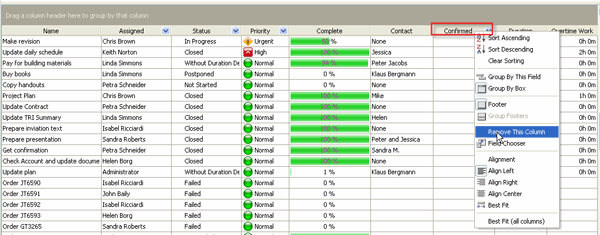
Users can customize the Task List and Task Tree view by adding columns from the list or removing columns they don't need.
_img98

Right-click on column header, select Remove This Column

You can change the position of any column by drag & drop.

_img112

Drag a column from its place and drop it to the new position between the columns

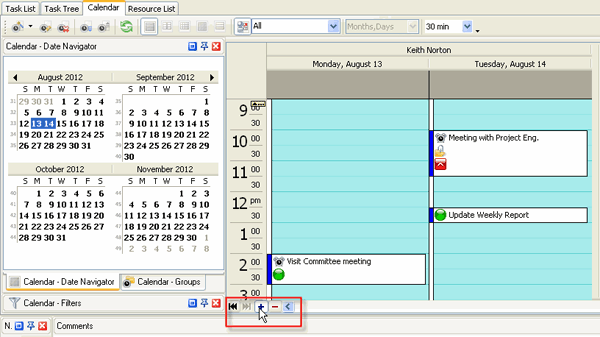
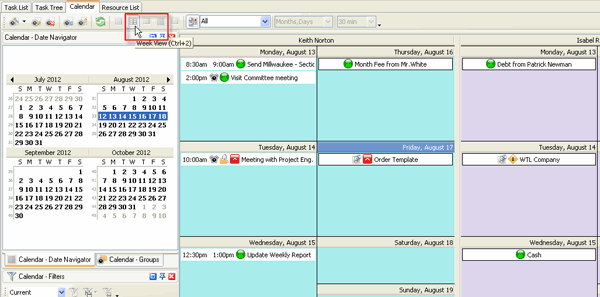
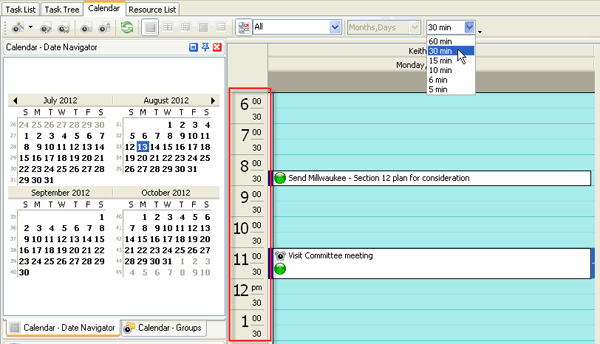
Users can customize Calendar view by adding or removing Resources Schedules, displaying Schedules for various time periods, changing Time Interval.
_img99

Display more ore less Resources Schedules
_img100

Select Weekly, Monthly or Yearly Schedule
_img101

Change Time Interval


  Buy Play Demo

Try Try It FREE
Overview VIP Task Manager


Task note
 
 
  Home Products Solutions Download Purchase Support Contact Us My Account 
Français   Deutsch   Articles   Search   Site Map
Copyright © 2005 - 2009 VIP Quality Software, Ltd. All Rights Reserved.