|
I can not connect to Sample database VIP Task Manager gives the following error:
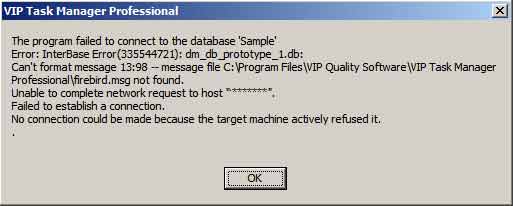
Or
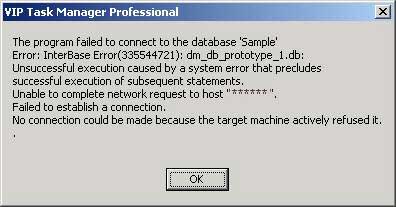
The possible cause of this issue is that "Firebird" database management system is not installed or started. To check it, please do the following:
1. Go to "Start -> Settings -> Control Panel -> Administrative Tools ->Services. See the attached screnshot.
2. Check if " Firebird Guardian" and "Firebird Server" are started, if they are not, double click on them to start them.
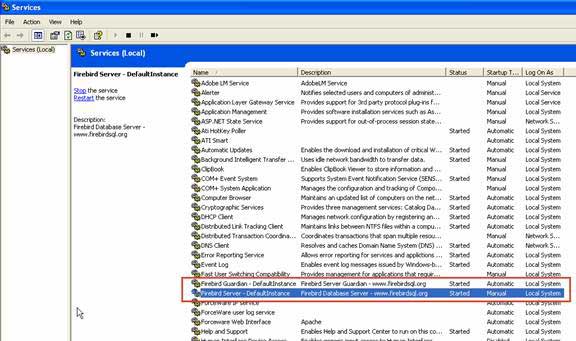
If you don't find "Firebird Guardian" and "Firebird Server" in services, I recommend you to uninstall and install our program again:
1. Close VIP Task Manager.
2. Download the latest version VIP Task Manager:
http://www.taskmanagementsoft.com/download/
3. Install it on your computer. I recommend you to read our Installation Guide:
http://www.taskmanagementsoft.com/products/taskmanagerpro/tutorials/installation-guide.php
4. Launch VIP Task Manager.
If that doesn't work you can download and install Firebird separately from our application.


|
 |
Skype

Available: Workdays, Monday - Friday
8 am - 8 pm GMT for Europe/Asia
1 am - 1 pm PST for America
|
|
 |
| |
Feb 1, 2016
TopTenReview: VIP Organizer is one of the best organizer software
TopTenReview has published Organizer Software Review 2016 and our product has been included to the list of the best software programs for personal information management. The author considers VIP Organizer to be a good choice if you are looking for something simple to help you organize your days.
More News
|
|
| |
|













 Try Travel Bundle FREE


