|
How to set permissions for each department head so that head can give task to his/her subordinates
If your department head or team leader needs to assign tasks to subordinates and is allowed to
view, edit, delete, and/or set permissions on a particular folder and each task within that folder while the same department head is not allowed to view tasks in a different folder (i.e. different project), you can use the following solution to set permissions for each department head.
It is possible to assign such team leader to a role and set permissions for tasks and projects on the level of role:
- Create a new role, ex.: Marketing Department Head
- Create Resource account, ex.: Joe Black
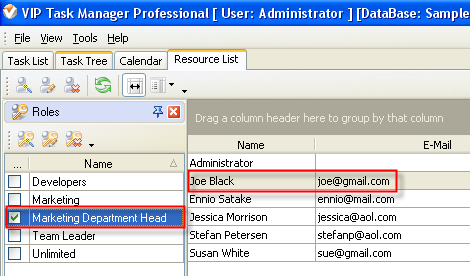
- To assign this resource to a role highlight Resource ‘Joe Black’ in Resource List and check box “Marketing Department Head” in Roles Panel.
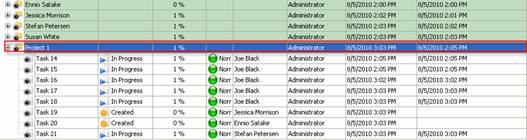
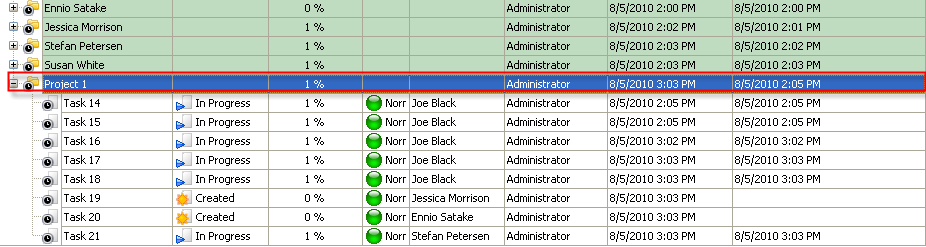
- Open Task Tree and highlight the task group that can be viewed by the department head and where he can assign tasks to his subordinates.
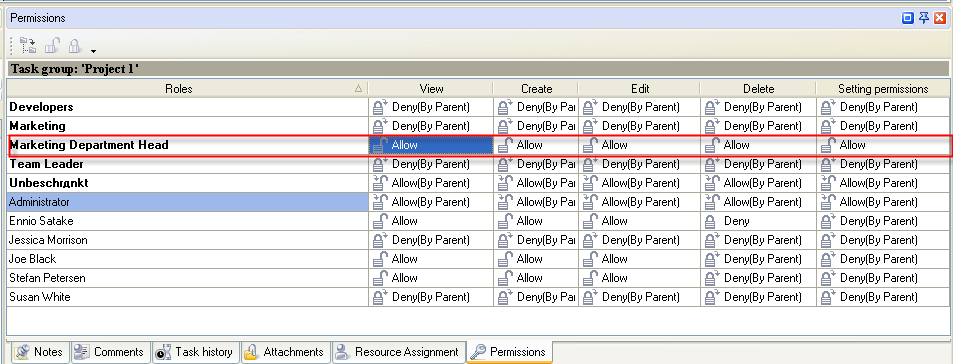
- To grant the permission to view the tasks of the subordinates and be able to set permissions for that task group select “Allow” for role 'Marketing Department Head' in Permission Panel.
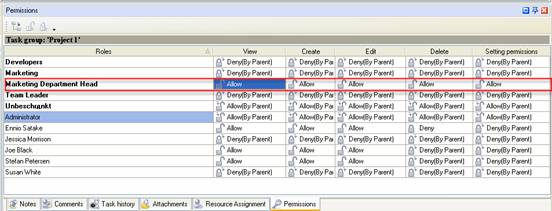
The department head Joe Black will automatically inherit the right of the role 'Marketing Department Head' to view, create, edit, delete tasks for “Project 1” task group.


|
 |
Skype

Available: Workdays, Monday - Friday
8 am - 8 pm GMT for Europe/Asia
1 am - 1 pm PST for America
|
|
 |
| |
Feb 1, 2016
TopTenReview: VIP Organizer is one of the best organizer software
TopTenReview has published Organizer Software Review 2016 and our product has been included to the list of the best software programs for personal information management. The author considers VIP Organizer to be a good choice if you are looking for something simple to help you organize your days.
More News
|
|
| |
|













 Try Travel Bundle FREE


