|
To set task recurrence use following steps:
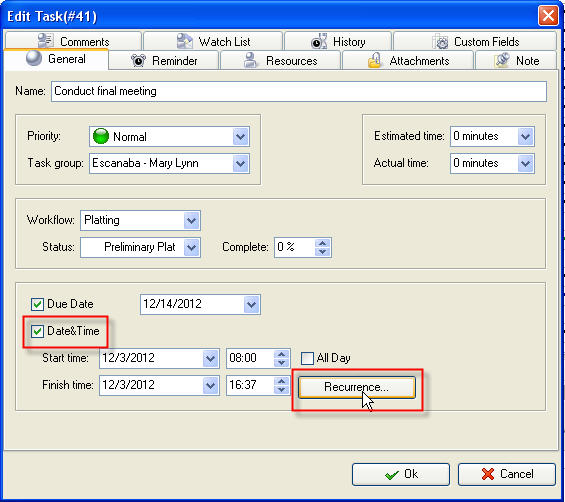
- Open "New Task" or "Edit Task" dialog
- Check "Date & Time" option and click "Recurrence:" button
-
In "Edit Recurrence" dialog use up-down buttons or keyboard to set task start and finish time or select required task accomplishing duration from "Duration" drop-down list
-
Set task recurrence interval (Daily, Weekly, Monthly, Yearly, Every Weekday or enter required day interval)
- Set task recurrence start date using "Start" drop-down box or keyboard
-
Set task recurrence finish date (it may be unlimited, after required number of recurrences or exact date)

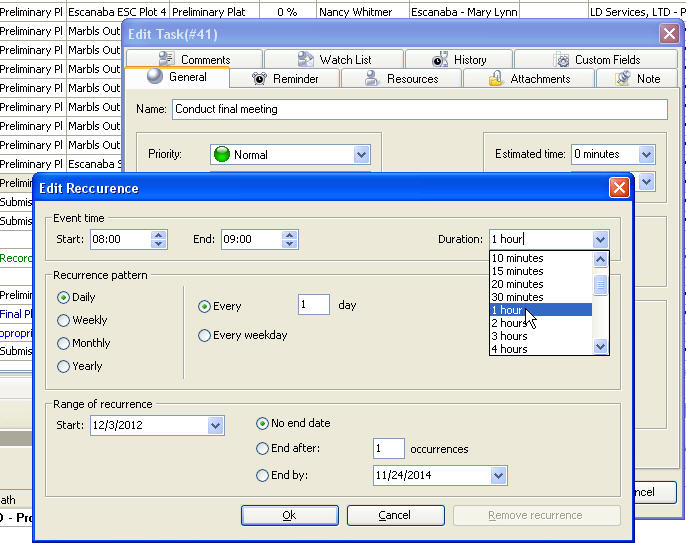
To cancel task recurrence click "Remove recurrence" button. |












 Play Demo
 Try It FREE