Task Management Software
Software for managing team projects, tasks, time, workflow and efficiency
 
Home
 
Products
 
Solutions
 
Download
 
Purchase
 
Support
 
Contact Us
 
My Account


Overview 
Features 
Screenshots 
Awards 
Version History 
Tutorials 
Online Help
<< username >>
<< password >>
Remember me on this computer
  Forgot your password?
  Register

Home  » Products  » VIP Task Manager Pro  » On line Help  » User Manual - How to create a new task

User Manual - How to create a new task

There are several ways to create a new task.

  1. Click on "New Task" button on Task List, Task Tree or Calendar toolbar.
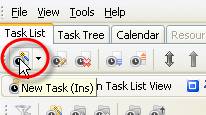
  2. Press "Ins" key
  3. Right click on Task List, Task Tree or Calendar grid and select "New Task" from drop-down list
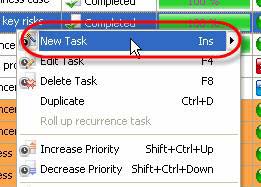
  4. Double click on Task List, Task Tree or Calendar grid empty space
Try Try It FREE

Buy Get the best price
Overview VIP Task Manager


Folder watchlist
 
 
  Home Products Solutions Download Purchase Support Contact Us My Account 
Articles   Search   Site Map
Copyright © 2005 - 2008 VIP Quality Software, Ltd. All Rights Reserved.