Task management software for group collaboration
 
HomeDownloadSupportPurchase
 
OverviewFeaturesScreenshotsAwardsVersion HistoryTutorialsOnline Help

User Manual - How to set task changes notifications

User Manual - How to set task changes notifications
   
Home  » Products  » VIP Task Manager Pro  » On line Help  » User Manual - How to set task changes notifications
How to set up and use Notifications
in 5 minutes
How to make action plans with VIP Task Manager Professional

The notifications of task changes are received by the owner of the task and the persons who are assigned to this task.

To set task changes notifications for other employees use following steps:

  1. Open "New Task" or "Edit Task" dialog
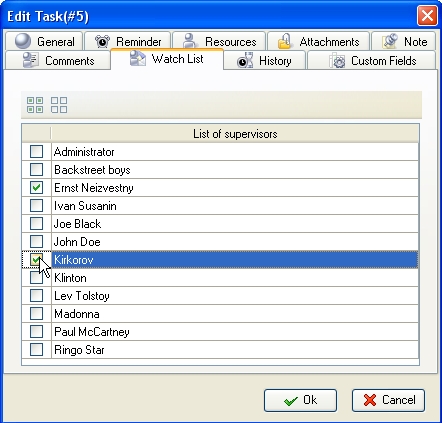
  2. Select "Watch List" tab and check the resources who you want to receive the notifications about this particular task changes
  3. Click "Ok" button

Tip:

  • If a task has "Draft" status, the notifications won't be sent. In order that required resources receive notifications change task status from "Draft" to "Created".

Play demo Play Demo

TryTry It FREE
Overview VIP Task Manager

» VIP Task Manager Pro
   VIP Task Manager Std
   Testimonials
   Turnkey Solution

Available: Workdays, Monday - Friday
8 am - 8 pm GMT for Europe/Asia
1 am - 1 pm PST for America


Schedule

May 7, 2012 New business management software release.

We are glad to introduce our new product that lets centralize your company’s business functions into all-in-one solution customized for your specific requirements and industry-related needs. Learn more

More News


Login:
Password:
Register
Forgot your password?
Login As:
Login As
You can log in if you are registered at one of these services:

ProductsSolutionsDownloadSupportPurchaseContactsForumVideoMy Account
Copyright © 2004 - 2012 Task Management Software


Site Map