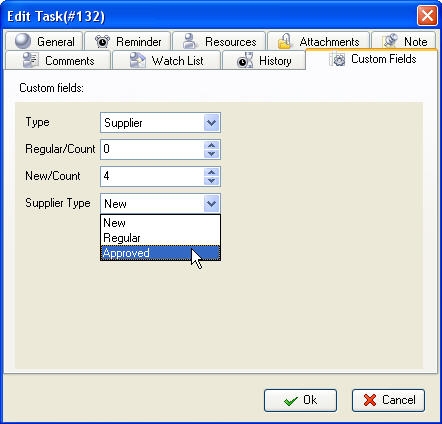
- Open "New Task" or "Edit Task" dialog
- Select Custom Fields tab
-
Enter required values by using the keyboard or up-down buttons or select custom field values from predefined drop-down list according to the type of the custom field
- Click "Ok"
Tips:
-
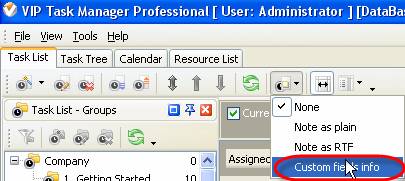
To display custom field values of the task under the task in Task List or Task Tree grid click on “Preview Mode” button on Task List or Task Tree toolbar and select “Custom fields info” from drop-down list
-
To hide custom field values of the task from Task List or Task Tree grid click on “Preview Mode” button on Task List or Task Tree toolbar and select “None’ from drop-down list
|


|
 |
| » VIP Task Manager Pro |
| |
| |
| |
 |
| |
Feb 1, 2016
TopTenReview: VIP Organizer is one of the best organizer software
TopTenReview has published Organizer Software Review 2016 and our product has been included to the list of the best software programs for personal information management. The author considers VIP Organizer to be a good choice if you are looking for something simple to help you organize your days.
More News
|
|
| |
|











 Play Demo
 Try It FREE