Task management software for group collaboration
 
HomeDownloadSupportPurchase
 
SupportFAQForumHelpdeskBlogCompanyContact Us

I have a problem getting more than one custom field to appear in a New Task dialog

I have a problem getting more than one custom field to appear in a New Task dialog
   
Home  » Support  » Frequently Asked Questions (FAQ)  » I have a problem getting more than one custom field to appear in a New Task dialog

To have all custom fields visible in a New Task dialog, please, do the following :

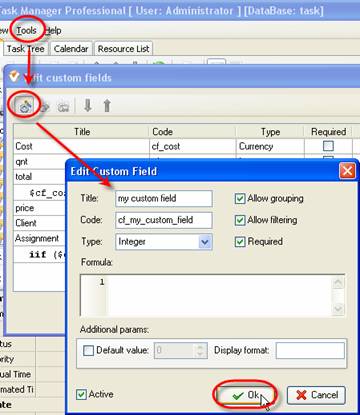
  1. Go to main menu command [Tools -> Custom Fields…] and create your own custom fields
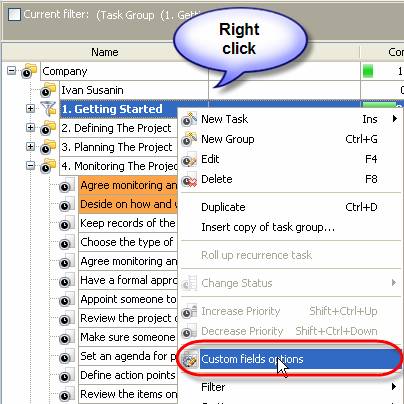
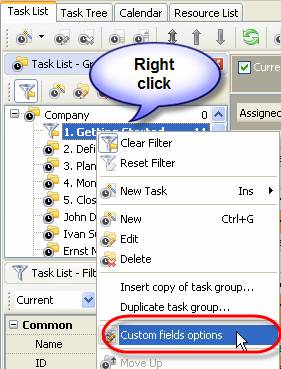
  2. Right click on required task group on Groups panel of Task List or Calendar view or Task Tree grid and select ‘Custom fields options’ from appeared drop-down list. If you want custom fields to be visible in a New Task dialog of all the tasks of your database, right click on the top task group.

  3. OR

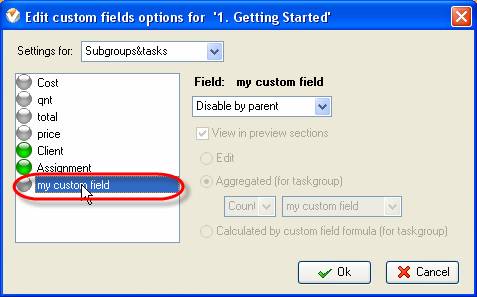
  4. Select one of created custom fields from the list
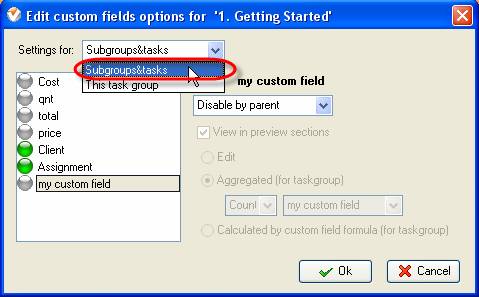
  5. Check that ‘Subgroups&tasks’ is selected from ‘Setting for:’ drop-down list
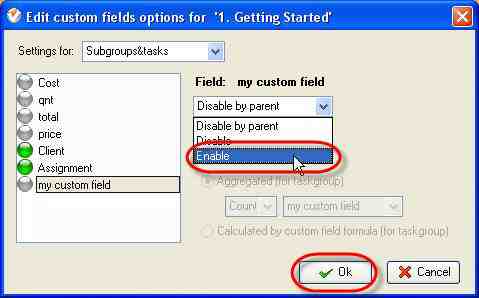
  6. Select ‘Enable’ from ‘Field:’ drop-down list and click 'OK' button
  7. Repeat steps 3-5 for all custom fields you want to be visible in a New Task dialog


Live Chat

Available: Workdays, Monday - Friday
8 am - 8 pm GMT for Europe/Asia
1 am - 1 pm PST for America)


Skype

My status

Available: Workdays, Monday - Friday
8 am - 8 pm GMT for Europe/Asia
1 am - 1 pm PST for America)


<< username >>
<< password >>
Remember me on this computer
  Forgot your password?
  Register


ProductsSolutionsDownloadSupportPurchaseContactsMy AccountForumArticles
Copyright C 2004-2010 VIP Quality Software, Ltd. All Rights Reserved
 
English   German    French     Russian