Task management software for group collaboration
 
HomeDownloadSupportPurchase
 
OverviewFeaturesScreenshotsAwardsVersion HistoryTutorialsOnline Help

User Manual - How to export resources

User Manual - How to export resources
   
Home  » Products  » VIP Task Manager Pro  » On line Help  » User Manual - How to export resources

There are several ways to export Resource List view to MS Excel or HTML.

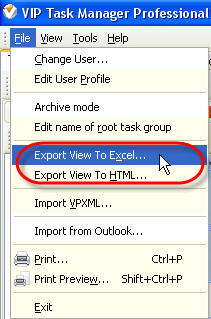
  1. Select main menu commands [File -> Export View To Excel:] or [File -> Export View To HTML:], enter export file name and path in "Export File Name" dialog.
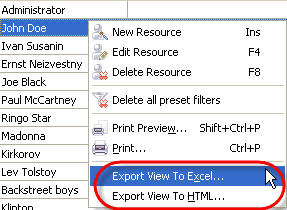
  2. Right click on Resource List grid and select " Export View To Excel: " or " Export View To HTML: " from drop-down list , enter export file name and path in "Export File Name" dialog.

Play demo Play Demo

TryTry It FREE
Overview VIP Task Manager

» VIP Task Manager Pro
   VIP Task Manager Std
   Testimonials
   Turnkey Solution

Available: Workdays, Monday - Friday
8 am - 8 pm GMT for Europe/Asia
1 am - 1 pm PST for America


Resource roles

May 7, 2012 New business management software release.

We are glad to introduce our new product that lets centralize your company’s business functions into all-in-one solution customized for your specific requirements and industry-related needs. Learn more

More News


Login:
Password:
Register
Forgot your password?
Login As:
Login As
You can log in if you are registered at one of these services:

ProductsSolutionsDownloadSupportPurchaseContactsForumVideoMy Account
Copyright © 2004 - 2012 Task Management Software


Site Map