Task management software for group collaboration
 
HomeDownloadSupportPurchase
 
OverviewFeaturesScreenshotsAwardsVersion HistoryTutorialsOnline Help

User Manual - How to use column 'Path' in Task List view, Reminder window and Notifications panel

User Manual - How to use column 'Path' in Task List view, Reminder window and Notifications panel
   
Home  » Products  » VIP Task Manager Pro  » On line Help  » User Manual - How to use column 'Path' in Task List view, Reminder window and Notifications panel

This feature was added to help users with identifying place of tasks within hierarchy of task groups. Column “Path” shows sequence of task groups from root folder to immediate folder that contains a task.

To see column “Path” use following steps:

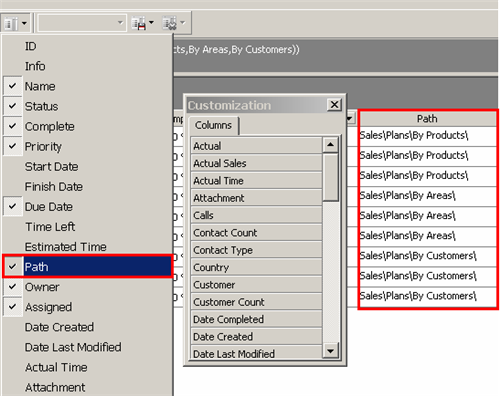
  1. If you do not see column “Path” in current layout of your Task List you should enable this column. Use “Field chooser” or “Task List columns” (option from main toolbar) to make column “Path” visible
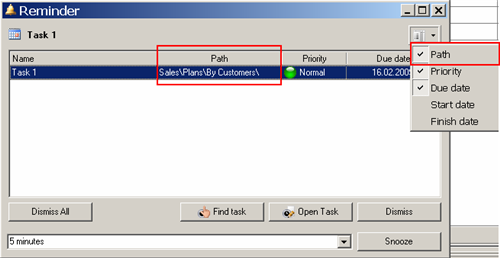
  2. Column “Path” is used within Reminder pop-up window by default, but you can disable or enable it if required
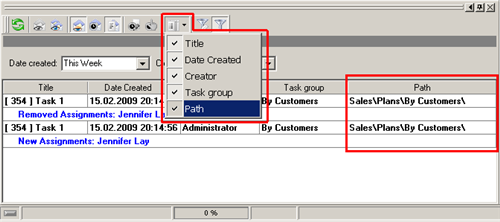
  3. To enable column “Path” in Notification panel use special option in toolbar


Play demo Play Demo

TryTry It FREE
Overview VIP Task Manager


Schedule (dates)

03.03.2010 Computerworld about VIP Task Manager
Computerworld Polska analyzes today's market of project management software in its article "From heavy artillery to open source". VIP Task Manager is chosen as an example of easy-to-use means for project management.

More News


<< username >>
<< password >>
Remember me on this computer
  Forgot your password?
  Register


ProductsSolutionsDownloadSupportPurchaseContactsMy AccountForumArticles
Copyright C 2004-2010 VIP Quality Software, Ltd. All Rights Reserved
 
English   German    French     Russian